The issue: we want to provide a set of assets to our users, but we don't want them to upload the assets online and share them with the world at large. If we give the users full access to the assets on their workstations, we can't really prevent them from uploading the files somewhere else; we can however, add invisible data to the assets, so if we do find them uploaded somewhere, we know which user uploaded them.
The process of invisibly encoding information in an image or other asset is called steganography -- literally, "concealed writing". The technique dates back to the Greek ruler Histiaeus, who shaved a messenger's head, tattooed a secret message on it, waited until the hair grew back, then sent him on his way. When the messenger arrived at his destination, he shaved his head and showed the message to the recipient. Since tattooing stuff on users' heads is frowned upon, we'll take a more subtle approach to hiding information in our digital assets.
Due to the range of possible asset types, there's no one-size-fits-all steganographic approach, but here's a list of high-level techniques for popular formats. We assume that the user has some kind of integer-based unique ID assigned to them [to avoid giving away the exact implementation, I'm going to be a little vague about which specific values I'm using for any of these techniques].
PNG
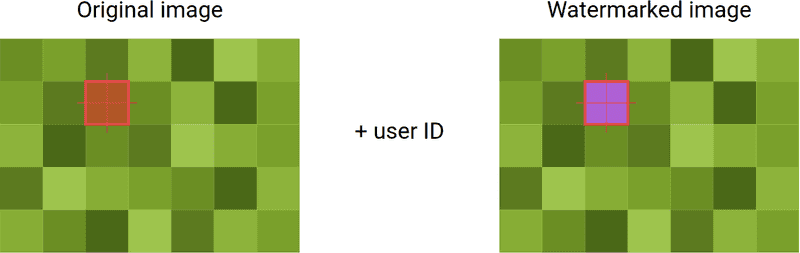
To encode the user's ID into a PNG image, we'll pick a set of x/y coordinates inside the image to use as our reference points; they should be scattered across the image, not all at the start or end. This ensures that even if the user tries to remove the steganography by cropping the image, at least one encoded ID should still be present.
We loop through each of the points we selected (say, 5/5, 235/26, 182/343), take the RGB value of each pixel at those coordinates, and convert the RGB to an integer:
def rgb_to_int(rgb):
    red = rgb[0]
    green = rgb[1]
    blue = rgb[2]
    RGBint = (red<<16) + (green<<8) + blue
    return RGBint
So rgb(174,86,34) would be transformed to 11425314. We then add the user ID (let's say it's 2739) to this integer to get 11428053. Feed that back to the inverse of the previous function:
def int_to_rgb(RGBint):
    blue =  RGBint & 255
    green = (RGBint >> 8) & 255
    red =   (RGBint >> 16) & 255
    return red, green, blue
And we get: rgb(174, 96, 213). Save that value back to the pixel we selected and repeat for the rest of the coordinates, and send this encoded image to the user.
Now let's say we find a copy of the image out in the wild. If we download this image, get the rgb_to_int values of our selected coordinates in both the downloaded image and our original copy, then subtract the values of the original image's points from our modified ones -- the difference will be the user's ID.
TIFFs
For TIFF-format images, since it's easy to convert this format to an array with numpy, we can use an even faster, simpler embedding technique. Just use tiffile to read the TIFF data, then call asarray() on it to get an array of numbers:
with TiffFile(file) as tif:
    data = tif.asarray()
    length = len(data)
    midpoint = int(length / 2);
    # the midpoint is the least likely part of the image to be modified by the user
We then split up the user ID into separate digits (padding with zeros as needed) and add each of these digits to a number in the array:
data[midpoint][0][0] = data[midpoint][0][0] + int(digits[0])
data[midpoint][0][1] = data[midpoint][0][1] + int(digits[1])
data[midpoint][0][2] = data[midpoint][0][2] + int(digits[2])
# and so on
For extra robustness, pick a few more portions of the array to add the user ID digits to. The decoding process is similar to that for PNGs -- load the original and the modified image data, then subtract the original values from the modified values to find the user ID:
def decode_tiff(original, modified):
  with TiffFile(original) as original:
    with TiffFile(modified) as modified:
      original_data = original.asarray()
      length = len(original_data)
      m = int(length / 2) # midpoint
      modified_data = modified.asarray()
      print(modified_data[m][0][0] - original_data[m][0][0], end = "")
      print(modified_data[m][0][1] - original_data[m][0][1], end = "")
      print(modified_data[m][0][2] - original_data[m][0][2], end = "")
      # and so on until you have the entire user ID
Maya files
To watermark Maya files in the .ma format, we'll take a similar approach of encoding the user ID as tiny changes in a set of the values in the asset. If we're padding the user IDs to six digits, for example, we'd take the last value in the "focal length" attribute line, remove the last 6 digits, and replace them with the user ID multiplied by a secret but determinable number ("the number of characters in the filename minus 4", for example).
We can also take the value of the nth decimal-only line in the file (or more than one), pick a specific value in that array and multiply it by 1,000,000 to get a larger number. To this number, we add the user ID, then divide it back by 1,000,000 to get something approximating the original value. To get the user ID back from the file, just run the same operations on the original copy and the modified one, then compare to get the user ID.
As a final piece of encoding, we can create an MD5 hash of the user ID and another secret but determinable value (the number of hyphens in the filename, or something similar), then add that to a metadata tag in the file. Decoding this is a little more cumbersome, since we have to check the hash against every user with access to the file, but can add another point of security if the userbase is small.
OBJ files
The OBJ format is used to encode static data -- vertices, texture coordinates, faces -- for visual effects software like Maya, Houdini, and Blender. Because the numbers involved in this data tend to be tiny, just adding the user ID to a line of vertex data like v -0.113662 0.022873 -0.177257 is going to wildly change the value of the vertex. To get around this, we divide the user ID by 1,000,000, then either add it (if the vertex value is positive) or subtract it (if the vertex value is negative) from a selected set of vertices in the file.
These tiny tweaks are essentially invisible to the end user, but allow us to reverse the operation, compare the modified to the original, and determine the user's ID. Without knowing which of the hundreds of thousands of vertices in the file has been modified, it's more or less impossible for the user to remove their hidden ID from the file.
Performance
A final note on keeping things performant -- if you're delivering asset packs with hundreds of assets in them, this watermarking process can be a slow and heavy one. If you're operating at any kind of scale, it's worth spawning off the watermarking processes into worker threads, instead of trying to run them all in the main thread. Additionally, since users may well download files more than once, caching the files for each individual user's ID in object storage once they've been watermarked, then serving these cached copies for subsequent requests, can save a significant amount of processing work.